


Every audit runs on evidence someone else has to send you. The PBC list goes out in a spreadsheet, responses come back by email, files land in a shared folder with names like final_v3, and somebody spends an afternoon each week working out which requests are still outstanding and who to chase.
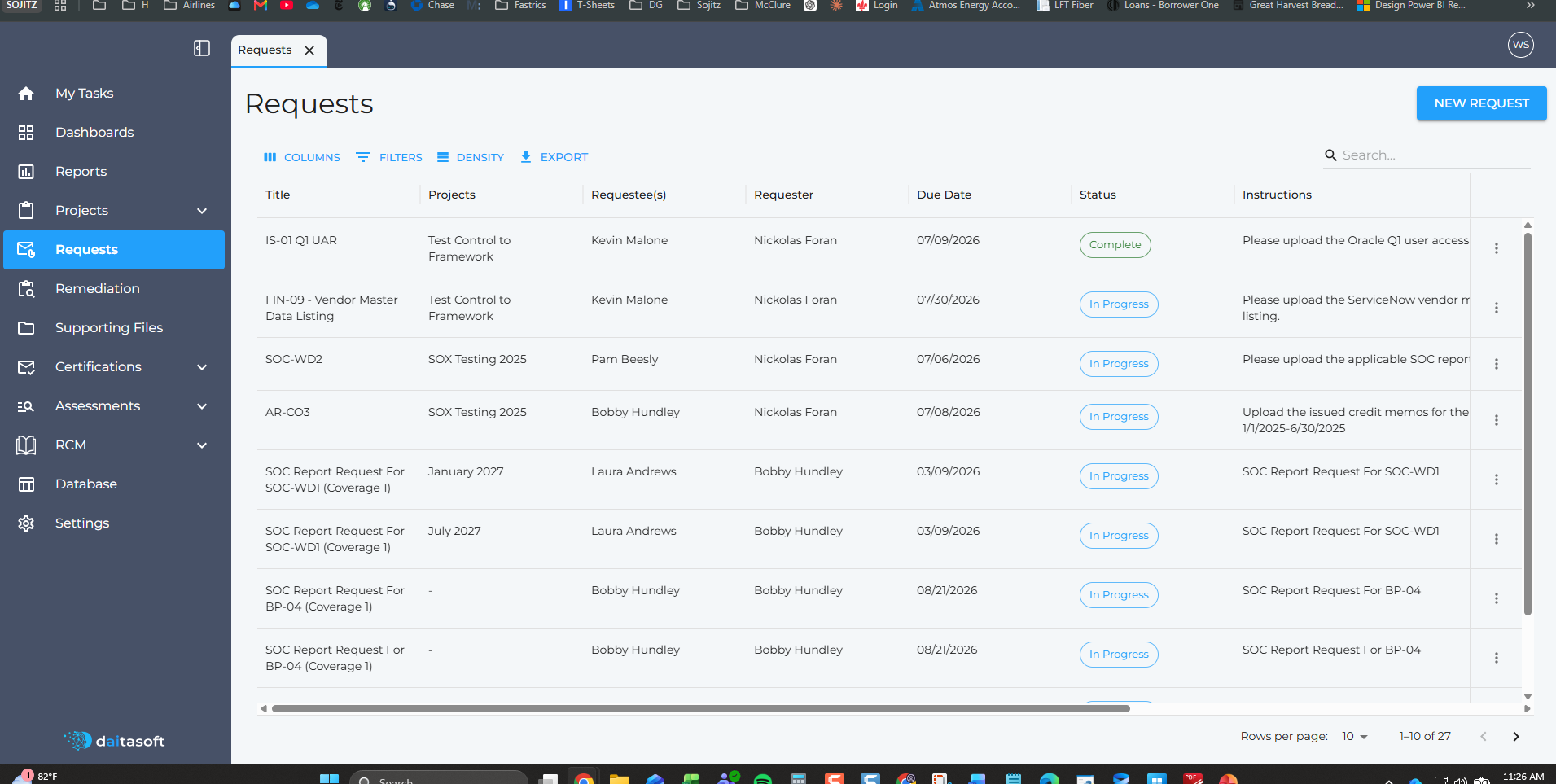
Request management in daitaGRC replaces that loop. Requests live in the tool, assigned to named people with due dates and instructions, tracked to completion in a single register.
Raising a Request
Each request carries the detail the recipient actually needs to act:
- Title: A short identifier — the PBC reference or control ID.
- Project: The engagement the request belongs to.
- Requestee: Who owes the evidence.
- Requester: Who asked for it, so the recipient knows who to come back to.
- Due Date: When it is needed.
- Instructions: Exactly what to provide, in plain language.
The instructions field carries most of the weight. "Please upload the Oracle Q1 user access listing" tells someone what to do. A line item on a PBC spreadsheet reading "UAR" does not, and the difference shows up in how many follow-up emails you send.
The Request Register
Every request across every project sits in one filterable, sortable, searchable list. Columns can be shown or hidden, density adjusted, and the whole register exported when someone wants it offline.
Status carries through the lifecycle — in progress until the evidence is received and accepted, complete once it is. Because requester and requestee are both recorded, the register answers the two questions that actually stall an audit: what is outstanding, and who has it.
Requests Tied to the Work
Requests connect to the project and control they support rather than standing alone. A request raised against a control test links to that test, so reviewers can trace from a piece of evidence back to what it was gathered for.
Some requests are generated from the work itself — a SOC report request tied to a specific control and coverage period arrives already titled and scoped, without anyone drafting it.
Workflows and Reminders
Due dates drive follow-up automatically. Rather than someone maintaining a chase list, the tool tracks what is outstanding against when it was due, and reminders go to the requestee.
That changes what the audit team spends time on. Chasing evidence is not audit work — it is administration that happens to be necessary. Automating it gives the time back.
Why This Matters
- One list. Every request across every engagement in one place, not scattered across inboxes and spreadsheets.
- Clear ownership. Every request names a requestee and a requester.
- Specific instructions. The recipient knows what to provide without a follow-up call.
- Automatic follow-up. Due dates drive reminders instead of someone's calendar.
- Traceable. Requests link to the projects and controls they support.
- Exportable. The register exports whenever someone needs it outside the tool.
Less Chasing, More Auditing
Evidence gathering is the least interesting part of an audit and one of the most time-consuming. Putting requests in a structured, tracked workflow does not make the evidence arrive faster on its own — but it does mean nobody has to reconstruct where things stand every Monday morning.