

Finding the issue is the easy part. What happens next is where audit teams lose time: the finding gets written into a workpaper, copied into a status tracker, emailed to a process owner, chased down three weeks later, and then reconciled against a separate list at reporting time. By the time someone asks whether an issue was actually remediated, the answer lives in four places and none of them agree.
The remediation module in daitaGRC closes that gap. Issues live in one place, connected to the audit work that produced them, owned by a named person, and tracked through to closure — with a dashboard that tells you where everything stands without anyone building a status deck.
Capturing the Issue
Issues are created directly in the tool, with the structure an audit file needs already built into the form:
- Issue ID and Summary: A consistent identifier and a one-line description.
- Issue Description: The full detail of what was found.
- Root Cause: Why the condition exists, captured at the point of identification rather than reconstructed later.
- Impact/Risk: What the issue means for the organization.
- Recommendation: The proposed corrective action.
- Magnitude and Likelihood of Misstatement: Severity inputs that drive classification and prioritization.
- Initial Identification, Report By, Date Found: The provenance of the issue, recorded automatically as part of the workflow.
The Impact/Risk and Recommendation fields include AI drafting assistance, so auditors can generate a first pass from the issue detail and refine it rather than starting from a blank field.
Connecting Issues to the Underlying Work
An issue that stands alone is difficult to defend under review. Every issue in daitaGRC can be linked to the audit evidence behind it:
- Project: The audit, assessment, or review that produced the finding.
- Workpaper(s): The documentation supporting the condition.
- Objective Test(s): The specific test that failed.
- Control(s): The control that did not operate as designed.
- Frameworks: The relevant standard — SOX, NIST CSF, or another framework in scope.
These links work in both directions. From an issue, reviewers can trace back to the test that identified it. From a control, teams can see every issue raised against it across projects and periods. That traceability is the difference between an issue log and an audit trail.
Recommendations, Action Plans, and Ownership
Once an issue is raised, a recommendation and action plan can be attached with an assigned owner and a target completion date. Ownership is explicit and visible, which changes the nature of follow-up: instead of asking who was supposed to handle something, the team can see who has it and when it is due.
Tracking Progress Through to Closure
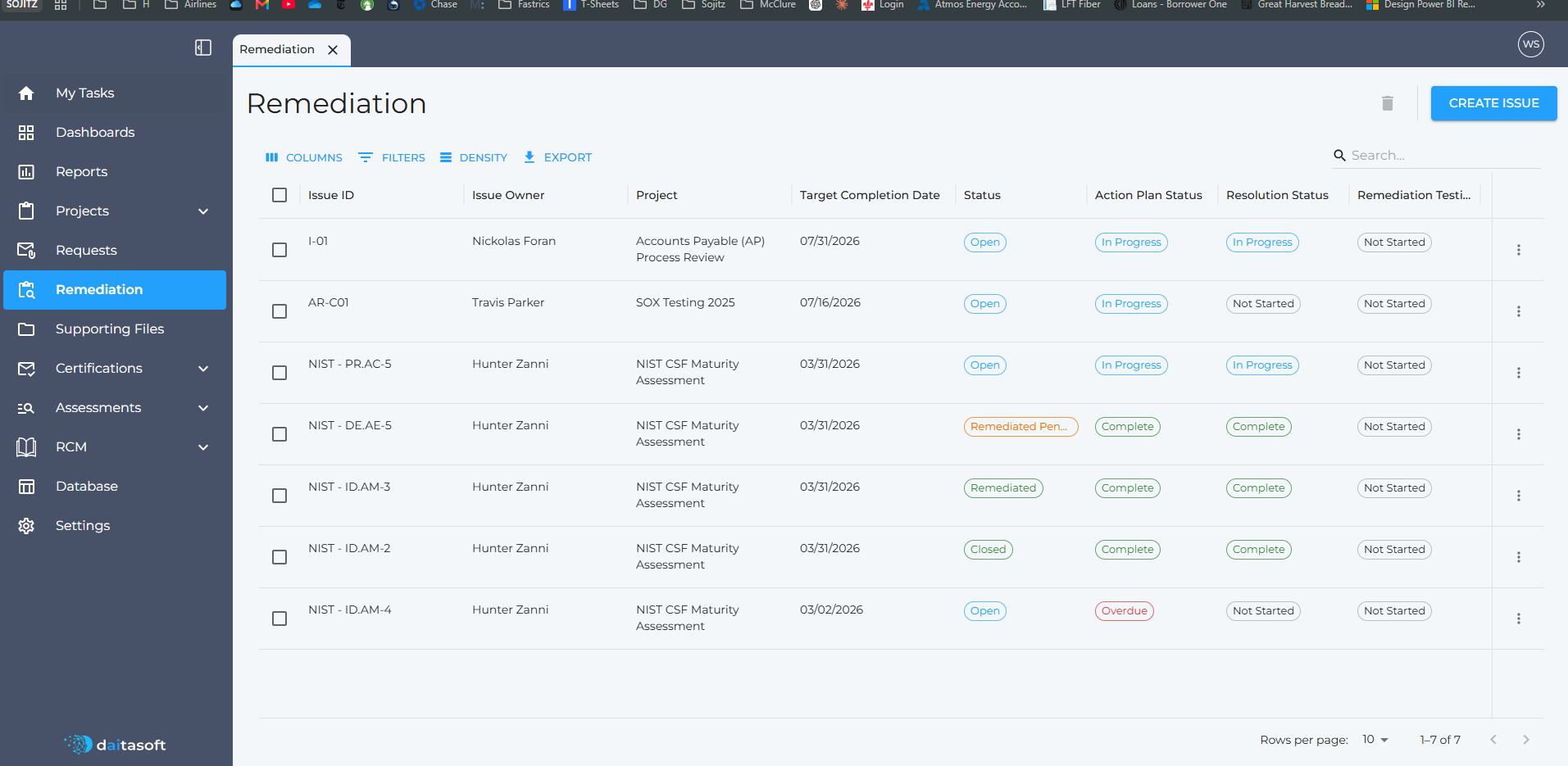
Remediation is not a single status — an issue can have an action plan in progress while the fix itself is unverified. The register tracks four independent dimensions:
- Status: Open, Remediated Pending Testing, Remediated, or Closed.
- Action Plan Status: Progress on the corrective action, including overdue flags against the target date.
- Resolution Status: Whether the underlying condition has been resolved.
- Remediation Testing: Whether the team has independently validated the fix.
Separating these prevents the most common reporting error in remediation tracking: treating "management says it's fixed" and "we tested it and it works" as the same thing.
The Issues Dashboard
Every issue in the register feeds a live dashboard, filterable by issue, status, and project:
- Open item counts for unremediated issues and total issue population.
- Remediation Status broken out across open, closed, remediated, and remediated pending testing.
- Severity Level distribution across significant deficiencies, deficiencies, and process improvements.
- Severity Level by Control Classification, showing where the most serious issues cluster.
- Remediation Status by Control Classification, for progress by control area.
The result is a snapshot that answers the questions leadership actually asks — how many issues are open, how severe are they, and which areas are behind — without anyone rebuilding it in a spreadsheet each month.
Why This Matters for Audit Teams
- Visibility: Issue status is current by default, not as of the last time someone updated the tracker.
- Accountability: Every issue has a named owner and a due date.
- Traceability: Issues connect to the workpapers, tests, controls, and frameworks behind them.
- Consistency: Every issue is captured with the same fields and classified the same way.
- Less administration: No status-chasing, no reconciling parallel trackers, no rebuilding the same summary each reporting cycle.
From Finding to Closed
The remediation module treats a finding as something with a life cycle rather than a line item in a report. Issues are raised with full context, connected to the work that produced them, assigned to an owner, tracked through remediation and validation, and reported in real time.
Audit teams spend less time managing the list — and more time on the issues that matter.